

Documents
Site register
Keep the register of operations on a site's pressure equipment, with a PDF filed automatically in its folder.
2 min read
A site's register lists, in date order, the operations carried out on its pressure equipment (PE): commissioning, repair, cleaning, inspection, requalification. It is part of the operating file. In cDESP, the register partly fills itself, you complete the rest, and an up-to-date PDF is filed after each change.
Open the register
- In the left menu, click My sites.
- Click the site name.
- At the top of the page, click Register.
The Site register window shows a table with the columns Date, Type of operation, Details of the operation, Comment, Name and position and Assembly. Rows are sorted from oldest to newest, as in a paper register.
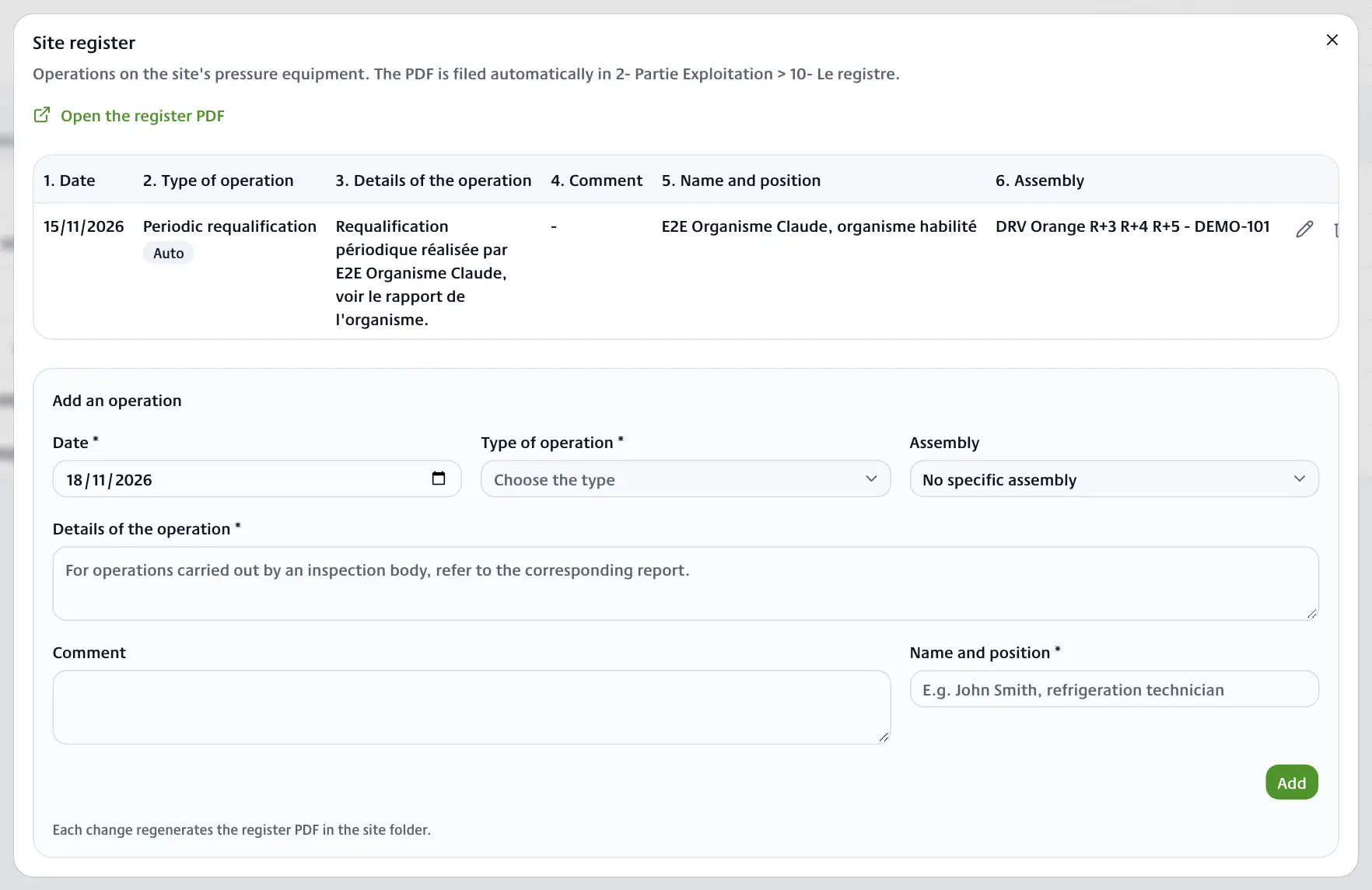
What is logged automatically
Rows logged automatically carry the Auto badge:
- Control documents made in cDESP: initial visit (VI), inspection plan (PI), periodic inspection (IP) and applicability audit. The row takes the intervention date of the report, its reference, its author and the system concerned.
- Appointments with a notified body (OH) marked as done in the planning: VI, IP and periodic requalification (RQ). The row refers to the body's report. See Inspection body appointments.
Each document or appointment has a single row. If you save the document again, its row is updated instead of being added a second time. If you delete the control, its row disappears. Details you corrected by hand are kept.
The inspection plan approval request and the PE follow-up report (PV de suivi ESP) are not logged in the register.
Add an operation
The Add an operation form is below the table. Fields marked with an asterisk are required.
- Enter the Date.
- Choose the Type of operation: Commissioning, Shutdown, Cleaning, Repair, Modification, Periodic requalification, Periodic inspection, Coating renewal, Safety accessories check, Idle period, Initial visit, Inspection plan, Audit or Other operations.
- In Assembly, choose the system concerned, or No specific assembly.
- Describe the operation in Details of the operation. For an operation carried out by a body, refer to its report.
- Add a Comment if needed.
- Enter the Name and position of the person who carried out the operation, for example "John Smith, refrigeration technician".
- Click Add.
The message "Register updated" confirms the save.
Edit or delete a row
- Edit (pencil): the row goes back into the form. Correct it, then click Save.
- Delete (bin): confirm "Delete this operation from the register?".
An Auto row can be edited and deleted like the others. A deleted automatic row does not come back if the document is edited later.
The register PDF
After each addition, change or deletion, cDESP rebuilds the "Pressure equipment register" PDF and files it in 2- Partie Exploitation > 10- Le registre of the site folder. Only the latest version is kept. It is therefore part of the folder's ZIP export.
To open it, click Open the register PDF at the top of the window.